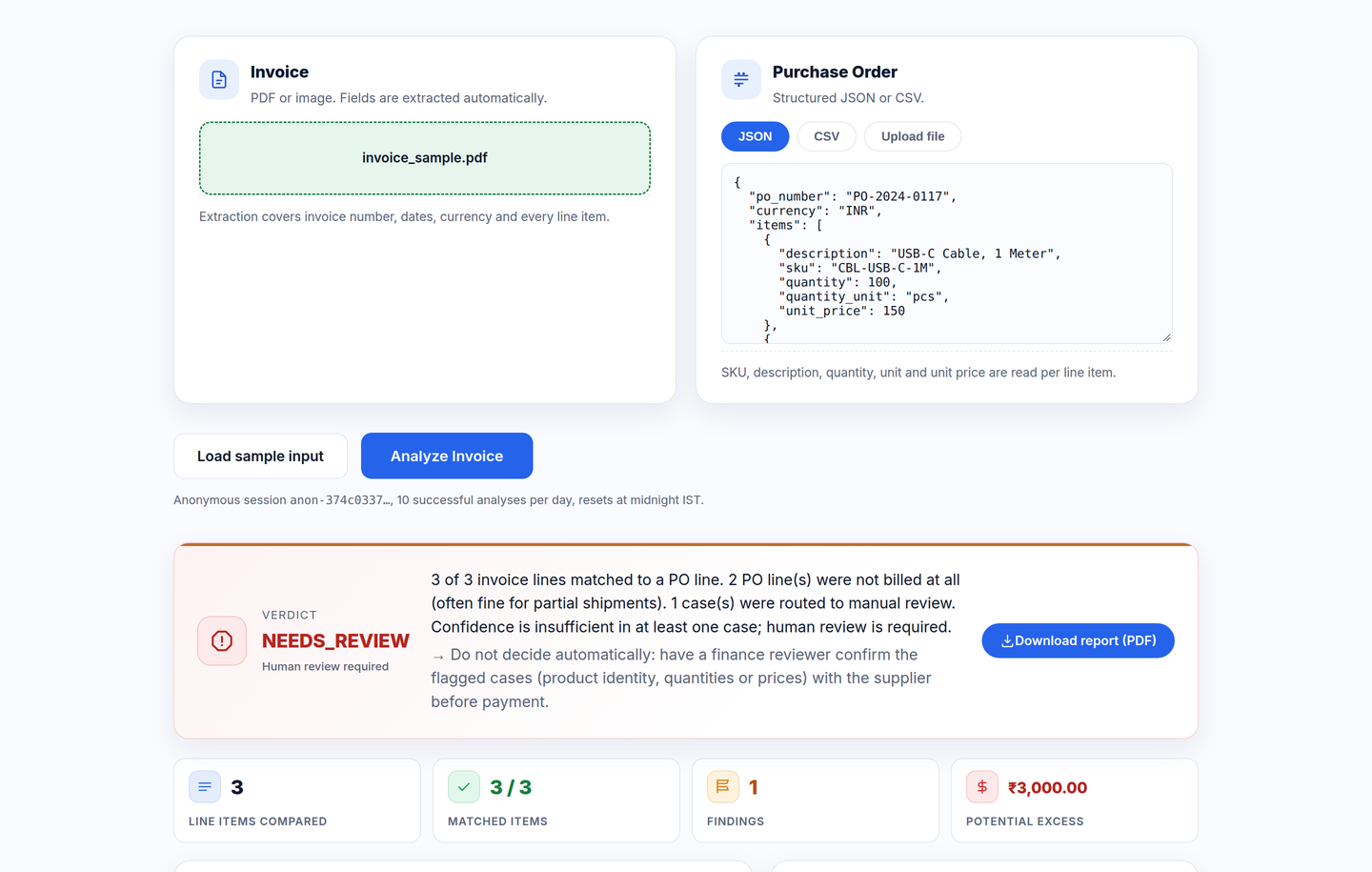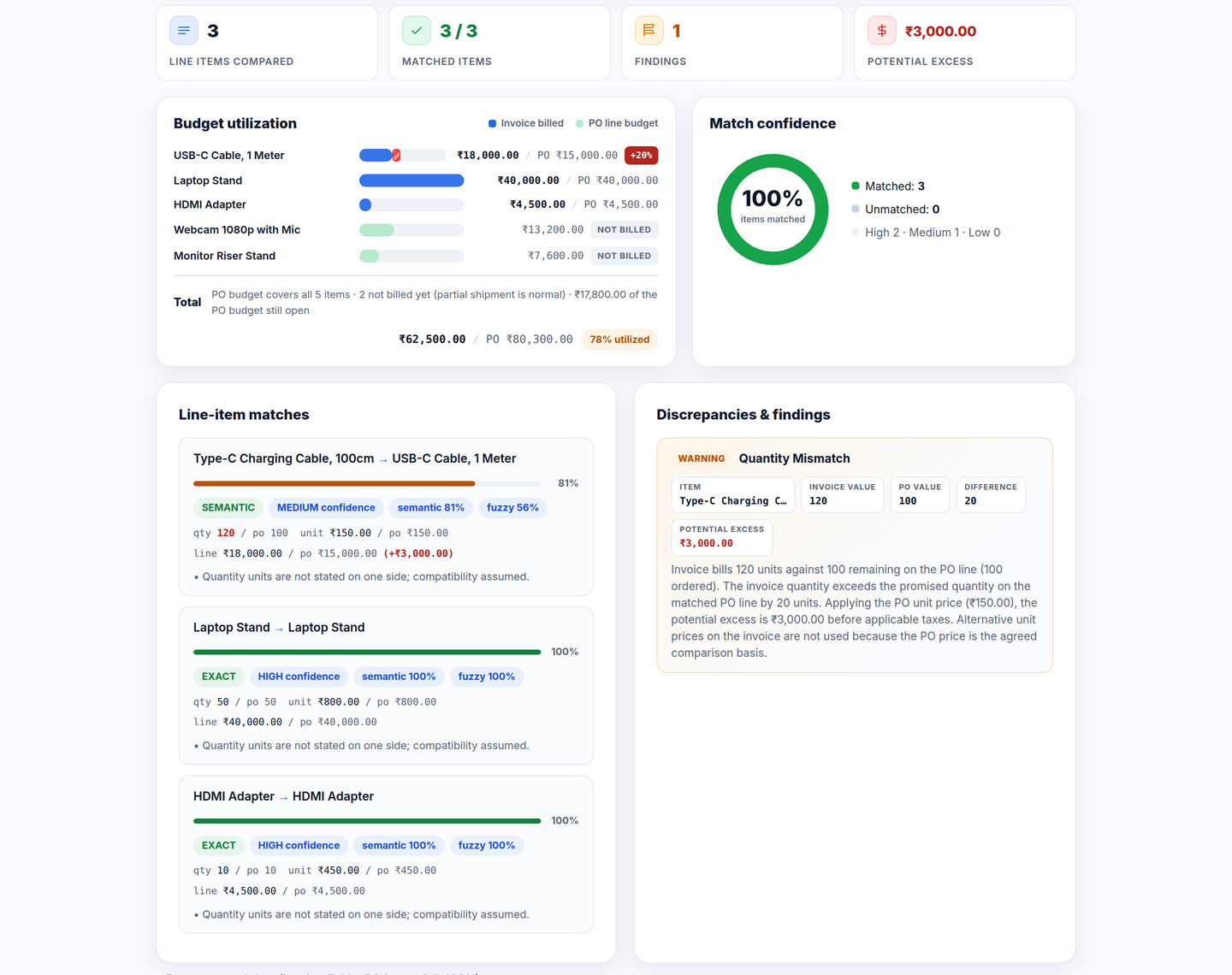
Semantic line matching
The same product found across reworded lines: USB-C Cable, 1 Meter vs Type-C Charging Cable, 100cm, scored by a local embedding model.
The same product shows up with a different description and invoices quietly drift on quantity and price. InvoiceGuard AI recognizes the product across wording differences, then validates the numbers with deterministic rules, and routes anything unsafe to a human.
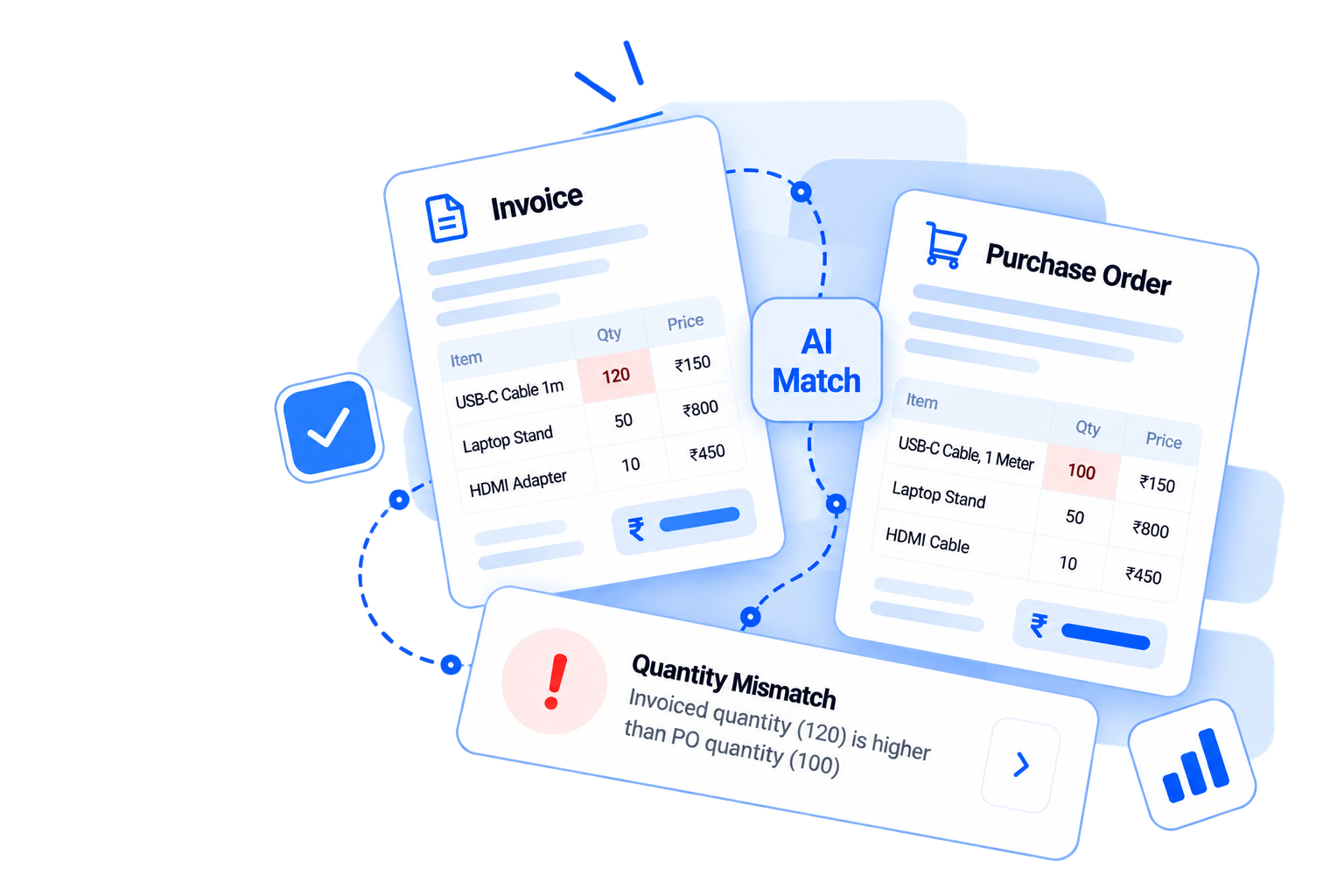
A focused evaluation loop: read both documents, match the lines, validate the money, and show the evidence for every decision.
The same product found across reworded lines: USB-C Cable, 1 Meter vs Type-C Charging Cable, 100cm, scored by a local embedding model.
Quantities and unit prices are recomputed with exact decimal arithmetic. Excess rupee figures are only stated on safe ground.
Every line total must equal quantity × price, and the stated subtotal is re-added. Failures are reported line by line.
Near-tie candidates and contradictory SKUs are routed to NEEDS_REVIEW instead of guessed. Nothing unsafe is stated as certain.
When currencies or quantity units disagree, the comparison basis is suppressed rather than multiplied wrongly.
Each browser session gets 10 analyses a day, enforced atomically at midnight IST. No account, no e-mail, no tracking.
Eight analyses a minute and one hundred per lifetime, per client IP — on top of the session allowance, enforced with the same atomic pattern. Rotating the anonymous session id unlocks nothing.
A bundled MCP server wraps this API as tools, so assistants like Claude or Cursor can run an invoice review in chat and read the verdict JSON’s status, discrepancies and amounts.
Verdicts render with a KPI strip, reconciliation and confidence visuals, and export to a branded one-page PDF report for the audit trail — no screenshots needed.
No configuration, no flowcharts to draw. Provide both documents and get a decision with evidence.
Invoice as a PDF or image. Purchase Order as JSON or CSV, or load the bundled sample. Nothing to configure.
SKU first, then exact text, then fuzzy and semantic similarity. Conflicting SKUs, units or specs are contradictions, not matches.
Quantities, unit prices and totals are recomputed. You get MATCHED, DISCREPANCY_FOUND or NEEDS_REVIEW, with the numbers.
Real output from a sample analysis: what matched, what was billed against the PO budget, and every finding with its numbers.
Upload to verdict in one sitting: sample invoice in, discrepancies out, PDF report downloaded — recorded in one take on the live app.
Every path a request can take — the happy one and the honest ones: rate limits, unreadable scans and invalid Purchase Orders stop explicitly, never with invented numbers.
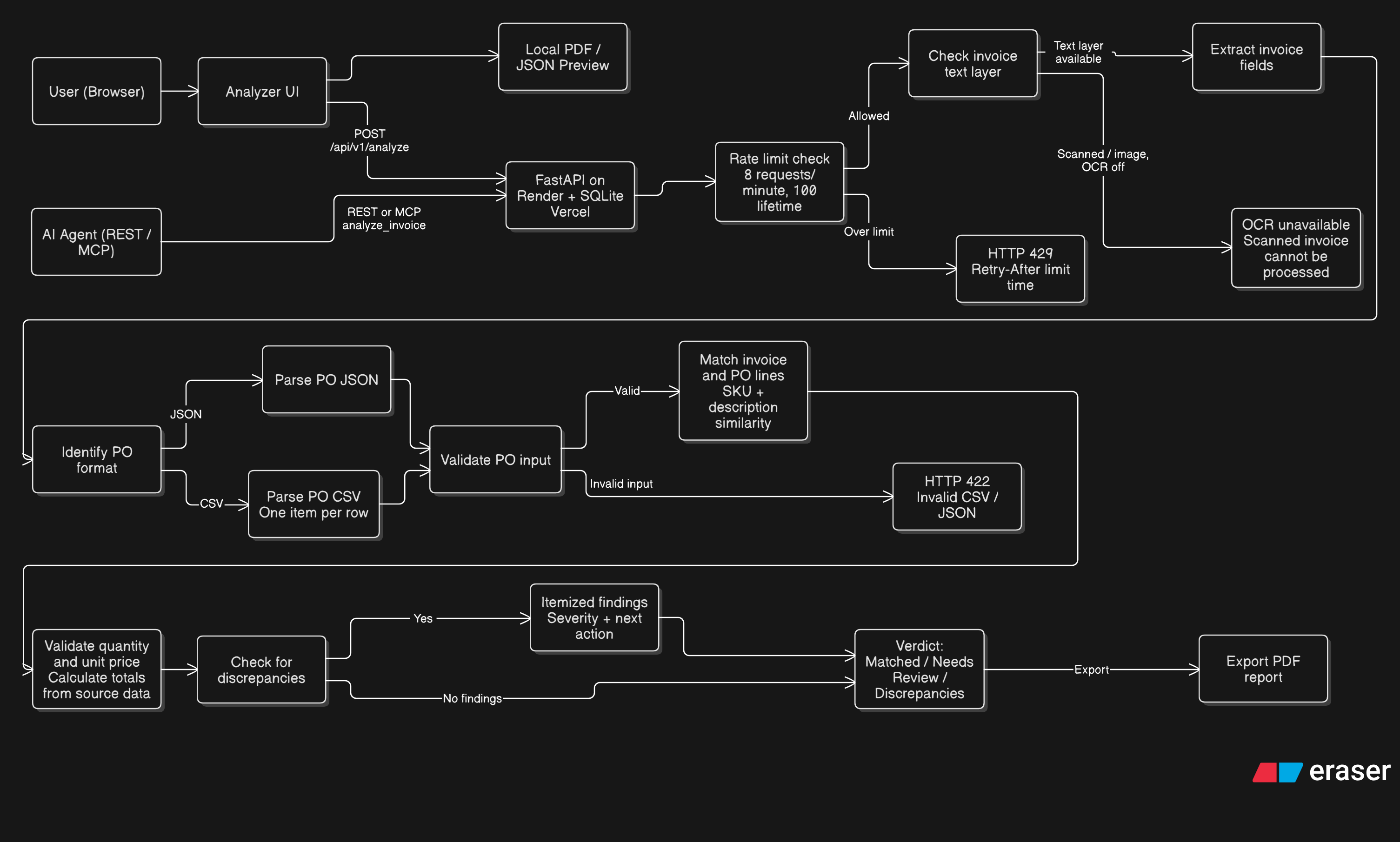
Diagram authored with Eraser diagram-as-code — kept in the team workspace so it evolves together with the pipeline.
No verdict appears without a basis. This is the full list of deterministic checks and what happens when one fails.
| Check | Compares | On failure |
|---|---|---|
| Quantity | Invoiced quantity against the ordered quantity of the matched PO line | DISCREPANCY_FOUND with the excess computed from the agreed PO price |
| Unit price | Invoiced unit price against the PO price for the same line | DISCREPANCY_FOUND with both prices shown side by side |
| Line total | Stated line total against quantity × unit price | DISCREPANCY_FOUND with the recomputed line total |
| Stated subtotal | Invoice subtotal against the sum of extracted line totals | DISCREPANCY_FOUND with the recomputed subtotal |
| Currency | Invoice currency against PO currency | Comparison basis suppressed and routed to review, no silent conversion |
| Quantity unit | Declared units on both documents (pcs, meters, kg...) | NEEDS_REVIEW plus a validation note, no invented conversion |
| Missing values | Presence of quantity, unit price and totals on both sides | NEEDS_REVIEW, totals and all figures are never guessed |
A public, free analyzer only stays fast and honest when abuse is stopped where it matters: inside the server, atomically, with every rejection explained.
Ten successful analyses per browser session per day. Capacity is reserved before the expensive work and released on any failure, so crashed requests never consume allowance. Resets at midnight IST.
Session ids are client-supplied, so a second, identity-agnostic layer keys on the client IP: eight analyses per rolling minute, one hundred per database lifetime. Denied attempts are never billed, and a minute-rate rejection carries a Retry-After countdown.
Scanned documents without OCR tooling, currency or unit conflicts, missing fields — each returns an explicit review state or a precise dependency message, never a confident number without evidence.
The REST API is the product: self-documented, callable from any script, and exposed to coding assistants through a bundled MCP server. Every platform limit applies identically to both.
Every check the app runs is one POST away. /docs is an OpenAPI playground; responses are the same verdict JSON the app renders.
API=https://invoiceguard-ai-15a1.onrender.com
curl -X POST $API/api/v1/analyze \
  -F invoice=@invoice.pdf \
  -F po_file=@purchase_order.json \
-F session_id=anon-41759671Register invoiceguard_mcp.py with any MCP client and your assistant reviews invoices itself. Answers flow through the same live API, limits included.
analyze_invoiceinvoice + PO → full verdict JSONusagesession → remaining allowance today{ "mcpServers": {
"invoiceguard": {
"command": "python",
"args": ["invoiceguard_mcp.py"] } } }One narrow job: read both documents, prove the match, validate every figure, and escalate whatever a human should decide.
Validate supplier invoices against the committed PO before the payment batch goes out, with every quantity and price recomputed from the agreed contract.
Catch silent over-billing early without standing up a full enterprise procurement suite. Load an invoice and a PO, get a decision with the numbers.
See the matching and validation approach end to end on real documents before committing to a platform or writing the requirement spec.
The complete analyzer is free today. Paid tiers are the roadmap for teams and institutions.
For individuals evaluating the workflow.
For finance teams that process weekly.
billed monthly
For institutions with procurement controls.
Everything marked (planned) is roadmap scope for this prototype; the free plan works in full today.
Open the standalone analyzer app: upload an invoice and its Purchase Order, and get a verdict with every number shown.
Open the analyzerShort, straight answers about how the engine works and what it does with your documents.
No. Parsing, embedding and validation all run in-process on the machine serving the page. The semantic encoder is a small local ONNX model (BAAI/bge-small-en-v1.5); there are no calls to external AI services.
MATCHED (checked and consistent), DISCREPANCY_FOUND (a reliable match with a quantity, price or totals conflict) and NEEDS_REVIEW (weak evidence, incompatible units or currency, or missing data). NEEDS_REVIEW always wins when the numbers would be unsafe to compare.
Invoices: PDF, PNG, JPG or WEBP up to 10 MB. Purchase orders: JSON or CSV, pasted inline or uploaded as a file. The CSV header needs description, quantity, unit_price and optionally sku, unit, line_total, po_number and currency — so the PO document header itself can be validated too. Unknown headers are rejected with the exact expected schema, never guessed.
Server-side. Each anonymous browser session reserves its allowance atomically before analysis starts, so concurrent requests cannot double-spend, and the counter resets at midnight IST.
Yes — a second layer rates every client IP directly: 8 analyses per rolling minute and 100 per lifetime, enforced with the same atomic database pattern. Because session ids are client-supplied, rotating them grants nothing new; the IP layer responds with 429 RATE_LIMIT_MINUTE or RATE_LIMIT_LIFETIME, and minute-limit responses include a Retry-After countdown. Denied attempts never consume allowance.
That is intended. The REST API is self-documented at /docs, and the repository ships invoiceguard_mcp.py — an MCP server exposing the API as analyze_invoice and usage tools for Claude Desktop, Cursor or any MCP client. Platform limits apply identically to agents and humans.
No. A MATCHED result is informational support for a reviewer; it is never a payment authorization. The prototype states that boundary in the interface, in the tests and on this page.
Questions about the matching engine, deployment, or procurement? Send a note or open an issue.